

User Flow Guide
This guide shows the simple flow of how Sawfish’s APIs work together for payments.
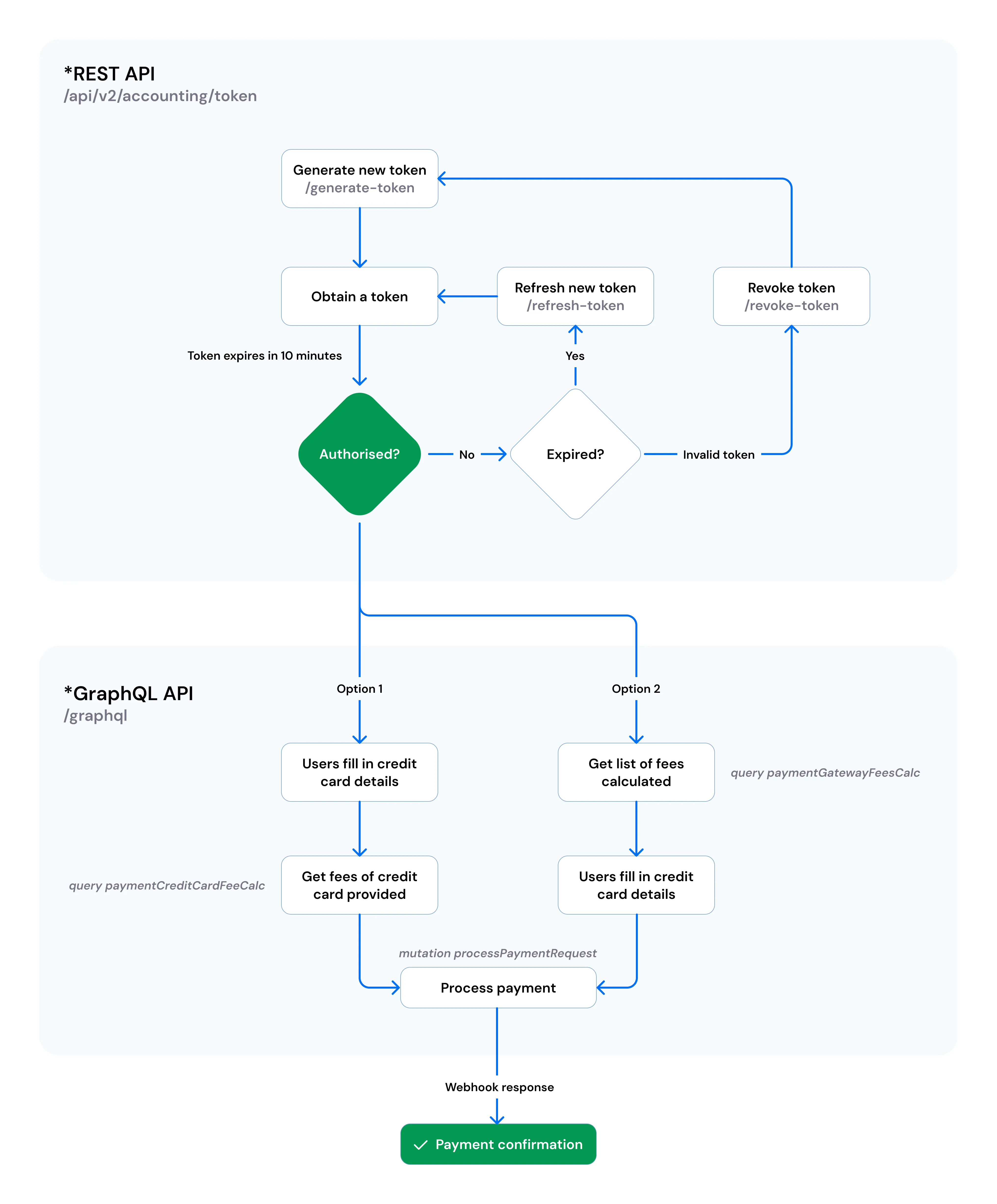
First, the system makes sure you have a valid token (a short-lived key for security). If it expires, you either refresh or generate a new one. Once authorised, the GraphQL API takes over - you can either:
- Check the payment gateway fees by filtering credit card details in the list of fees, then processing the payment.
- Or get the payment gateway fee after users fill in their credit card details, then processing the payment.
Finally, Sawfish confirms the result by sending a webhook back to your system.
Step by step
Section titled “Step by step”- Authenticate - call Generate Token with your
x-client-idandx-api-key. Tokens expire after 10 minutes; use Refresh Token to obtain a new one. - Calculate fees - use Get Payment Gateway Fees for a list of fees by card type, or Get Fee of Credit Card for the exact fee once card details are known.
- Process the payment - call Process Payment with the card, contact, amount, and fees.
- Handle the result - the initial response confirms the payment request was initiated. The final status (success or failure) is delivered to your registered webhook URL.